This official guide explains how to deposit and withdraw inside the PAK234 app using JazzCash and Easypaisa. It covers the exact in-app steps, the correct wallet number format, and common reasons deposits/withdrawals fail—plus what to do next.
Note: Deposit/withdrawal rules, minimum amounts, and wallet requirements are shown inside the app. Always follow the latest prompts on the Wallet / Deposit / Withdraw pages.
Supported Payment Methods in PAK234 (Pakistan)
PAK234 currently supports two main local wallet methods:
- JazzCash
- Easypaisa
Both can be used for deposits and withdrawals, but the confirmation flow may differ by payment method.
How to Deposit in PAK234 (Deposit Entry)
Deposit entry path
App Lobby → bottom-right “Deposit”
Open the deposit page, then select JazzCash or Easypaisa and follow the steps below.

JazzCash Deposit
Wallet number format (Important)
When entering your JazzCash number, make sure you use the correct format.
Currently, there are 3 JazzCash payment channels (this may be updated in the future, but the overall process is similar). In most cases, you will need to enter an 11-digit wallet number starting with 03 (example: 03123456789).
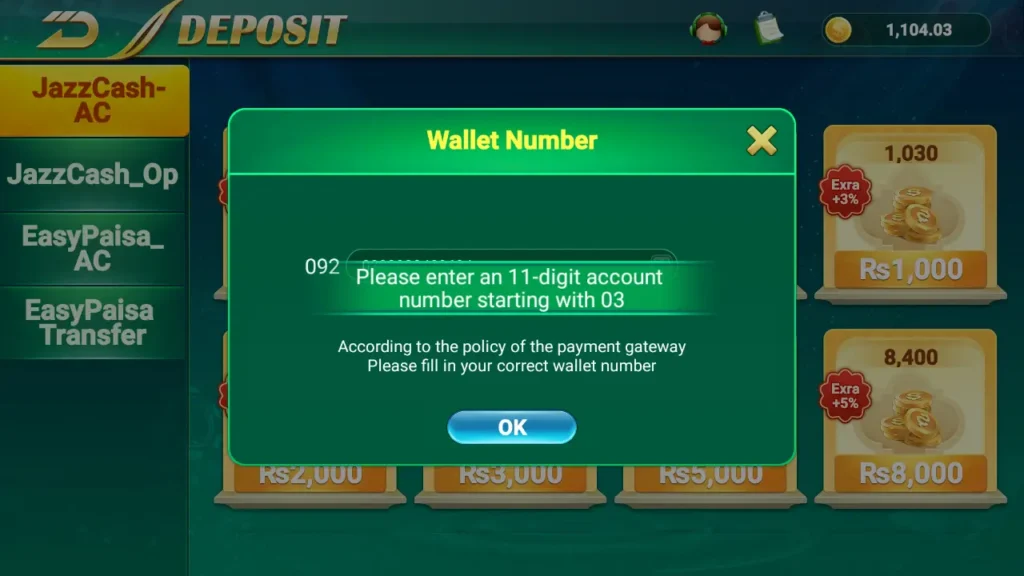
Some channels may request 11 digits or 10 digits depending on the page prompt. Always follow what the deposit page requests.
JazzCash payment channels (3 types)
1) JazzCash_ST
- Select JazzCash_ST and choose your deposit amount
- Enter your JazzCash wallet number (as required on the page)
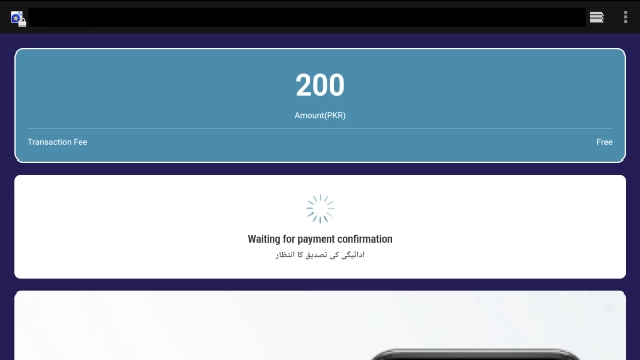
- A payment screen will show an MPIN prompt
- Remember the MPIN, then pay in the JazzCash app:
JazzCash App → My Account → Payment Request → Select the transaction → Enter MPIN → Pay
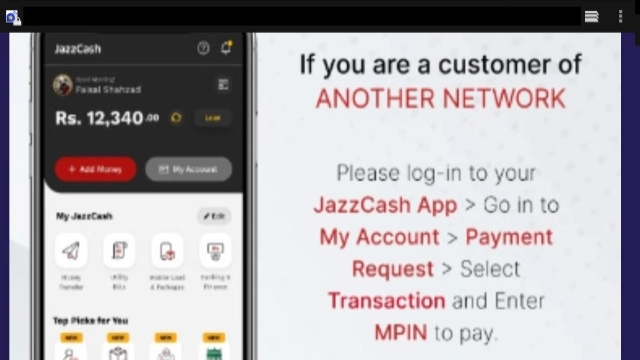
2) JazzCash_OP
- Enter the page and input your wallet number again as requested
- This channel usually asks for 10 digits starting with 3 (example: 3123456789)
- Confirm the number, then open the JazzCash app to complete payment
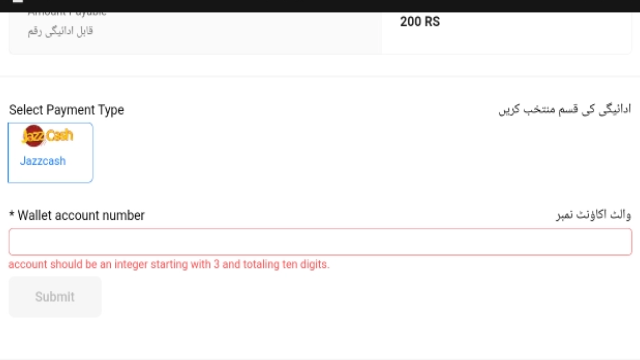
3) JazzCash_AC
- Enter the page and input your wallet number again as requested
- This channel usually asks for 11 digits starting with 03 (example: 03123456789)
- Confirm the number, tap Send OTP, and follow the prompts to complete payment in the JazzCash app
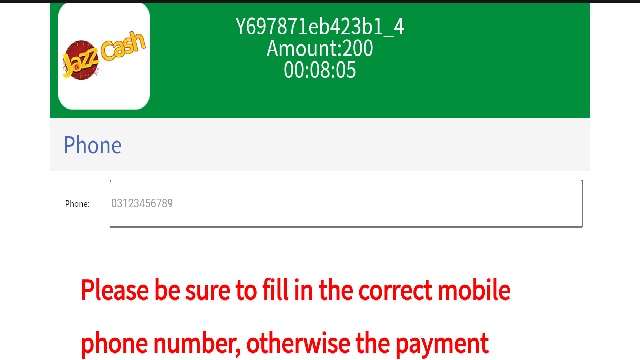
✅ Most important rule: Before you submit, double-check the amount and wallet number carefully. If the number is wrong, recovery may not be possible.
Easypaisa Deposit
Currently, Easypaisa has one main payment method.
Easypaisa Transfer
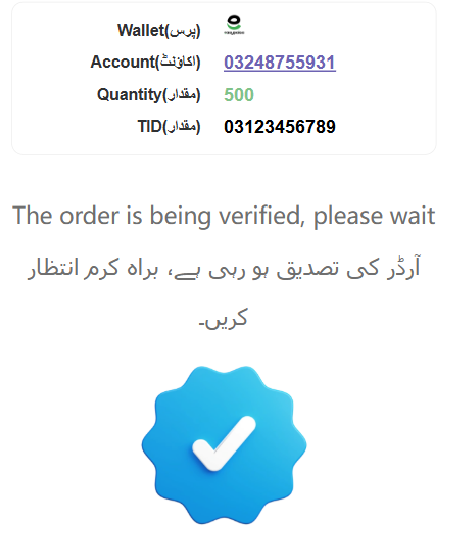
- Enter the Easypaisa deposit page and you will see a screen like the example below
- Copy the displayed Account and Quantity (amount)
- Enter your Easypaisa wallet number (11 digits starting with 03, as prompted)
- Confirm and then open the Easypaisa app to complete the manual transfer
- Return to the PAK234 deposit page—you may see a status like Verifying / Checking
- Once verification is complete, your balance will be added to your PAK234 account balance
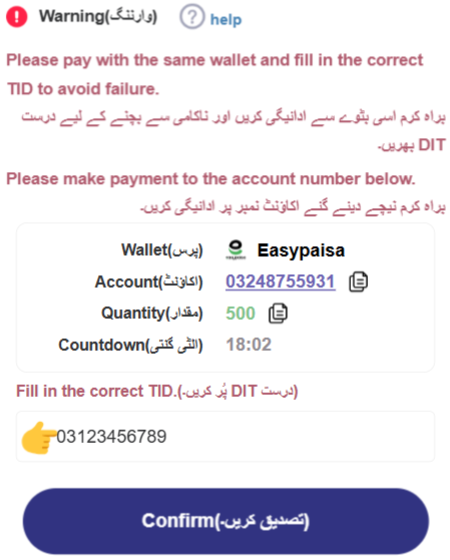
Deposit Failed? Common Reasons and Fixes
User-side reasons (most common)
1) Wrong wallet number entered
There is no safe “fix” for a wrong number. Always double-check three times before submitting.
2) Network interruption / unstable internet
Refresh the page, reconnect your network, and try again.
3) Wallet account cannot complete the transfer
Examples: wallet not activated, transfer limit reached, or insufficient balance.
4) App version is too old
Update to the latest PAK234 version and try again.
Platform / payment-side reasons
1) Payment network delay (deposit shows completed, but funds are not credited yet)
Payment channels may experience delays. Wait briefly and check your wallet records again.
2) Deposit shows failed, but you’re unsure whether money was deducted
Check JazzCash/Easypaisa first to confirm whether the funds were actually deducted.
- If not deducted, you can retry
- If deducted, do not repeat multiple deposits—contact support and provide your deposit record
3) Temporary gateway fluctuation
If the payment gateway is under maintenance or unstable, try again later.
If you need help, send support(our app’s customer service) your deposit record details (method, amount, time, and any reference/transaction info).
PAK234 Withdrawal Guide (Withdraw Entry)
Withdraw entry path
App → bottom-right “Withdraw”
You can withdraw to:
- Easypaisa
- JazzCash
Before withdrawing, confirm the checklist below.
Withdrawal Checklist (Must Confirm)
1) Wallet binding information is correct
Make sure the wallet number/name (if shown) is correct.
If you changed your wallet number or entered incorrect information, contact support to update it (verification may be required for account safety).
2) Your wager requirement must be “0“
In PAK234, wager refers to the turnover requirement related to withdrawals, usually generated by deposits or certain event bonuses.
- If wager requirement ≠ 0, you cannot withdraw
- Wager decreases as you play: as you continue playing, the wager requirement reduces, with a minimum of 0
3) Minimum withdrawal amount + integer rule
Check the minimum withdrawal requirement shown on the Withdraw page.
Withdrawals usually must be:
- Above the minimum withdrawal amount, and
- An integer amount (no decimals), as shown on the page prompt
Once all conditions are met (wallet correct, wager requirement = 0, and sufficient balance), you can submit your withdrawal request.
Withdrawal Failed? Common Reasons and Fixes
User-side reasons
1) Wallet info mismatch / incorrect binding
Contact support to correct it (verification may be required).
2) Wager requirement not cleared (not 0)
Continue playing until it reaches 0, then try again.
3) Amount below minimum or amount format not allowed
Follow the Withdraw page prompt (minimum + integer rule).
Q&A (Deposit & Withdrawal)
Q1: Where is the deposit entry in PAK234?
Go to App Lobby → bottom-right “Deposit”. Then choose JazzCash or Easypaisa on the deposit page.
Q2: What wallet number format should I enter for JazzCash/Easypaisa?
In most cases, enter an 11-digit wallet number starting with 03 (example: 03123456789).
Some JazzCash channels may request 10 digits starting with 3 (example: 3123456789). Always follow the exact format tips shown on the deposit page.
Q3: Why did my deposit fail?
The most common reasons are:
- Wrong wallet number entered
- Network interruption or unstable internet
- Wallet not active / insufficient balance / transfer limit reached
- Payment gateway delay or temporary fluctuation
Q4: Deposit shows “Completed” but the balance didn’t update—what should I do?
This is often caused by payment network delay. Wait briefly and re-check your wallet records. If it still doesn’t credit, contact support and provide your deposit details (method, amount, time, and any reference/transaction info).
Q5: Where is the withdrawal entry in PAK234?
Go to App → bottom-right “Withdraw” and select JazzCash or Easypaisa.
Q6: Why can’t I withdraw even if I have a balance?
In most cases, one of these applies:
- Your wager requirement is not 0
- Wallet binding information is incorrect
- Your withdrawal amount is below the minimum or not an allowed integer amount
Check the Withdraw page hints and make sure wager requirement = 0 before submitting.
Q7: What does “wager requirement” mean, and how do I clear it?
The wager requirement is the turnover requirement linked to withdrawals and is usually generated by deposits or certain event bonuses. It decreases as you play. Keep playing until the wager requirement reaches 0, then withdraw.
Q8: I submitted a withdrawal but it’s still “Processing”—what should I do?
Processing time can vary due to network or payment checks. Avoid submitting repeated withdrawals. If the status stays unchanged for an unusually long time, contact support with your withdrawal record.
For the latest PAK234 APK, official guides, and verified updates, please visit the PAK234 official website: pak234game.com.